Test annual gross salary 10% higher
Annual gross salary (₹): ₹12,00,000 → ₹13,20,000
Estimated monthly take-home₹92,600₹1,02,600
TAX & SALARY · FREE TOOL
Convert annual pay into an estimated monthly take-home amount. Adjust the assumptions and see how the result changes.
Interactive tool
Change the inputs to compare scenarios. Your values stay in this browser.
Tax is user-entered; this does not calculate slabs, select a tax regime or reproduce a payslip.
QUICK TAKEAWAY
This is a result from the assumptions currently entered. Compare a few alternatives below before drawing conclusions.
BASED ON YOUR INPUTS
With these inputs, estimated monthly take-home is ₹92,600.
For context, estimated annual take-home is ₹11,11,200.
Test annual gross salary 10% higher changes estimated monthly take-home from ₹92,600 to ₹1,02,600 in this model.
Model note: Tax is user-entered; this does not calculate slabs, select a tax regime or reproduce a payslip.
TRY A DIFFERENT ASSUMPTION
Each card recalculates from the inputs above.
Annual gross salary (₹): ₹12,00,000 → ₹13,20,000
Annual employee PF (₹): ₹86,400 → ₹77,760; Annual professional tax and other deductions (₹): ₹2,400 → ₹2,160
A MINI CHALLENGE
Test a value here first. Your calculator changes only if you apply it.
Challenge reached: an 80% modeled take-home share.
Calculations run locally. Browser activity remembers calculator visits and quiz scores only—not financial inputs or results. Share links include values only when you choose to share them.
PaisaCalc guide · India

This Salary Calculator converts annual gross salary into estimated annual and monthly take-home pay. Enter four rupee values: annual gross salary, annual income tax or TDS, annual employee PF, and annual professional tax plus other deductions. It subtracts the entered deductions and divides the balance by 12 for a monthly average. It is a budgeting estimate, not an official payslip or tax assessment.
A person in Bengaluru, Pune, or Delhi can enter the gross figure from an offer or salary statement and replace sample deductions with a recent payslip's figures. Employer-side contributions are not removed unless included in an entered deduction, so the inputs must describe the same salary period.
An Indian job offer may highlight CTC, while household expenses are paid from the bank credit after payroll deductions. Separating those concepts helps a new employee judge rent, commuting, food, insurance, and savings against a realistic monthly cash flow. The estimate can also reveal why two offers with similar headline packages may produce different regular deposits when their fixed pay, variable pay, PF, or other benefits differ.
Use it before accepting an EMI, increasing a SIP, or setting an emergency-fund target. It does not replace a lender's eligibility process or payroll computation. Ask whether a quoted figure is gross salary or CTC, which deductions recur, and whether a bonus is paid monthly, quarterly, or annually.
First, enter annual gross salary in rupees, using the gross amount for the period you are analysing. Next, enter the annual income tax or TDS amount actually expected from payroll. Then enter annual employee PF and annual professional tax plus other deductions. All four inputs are annual values; entering a monthly PF amount in the annual field would understate the deduction by a factor of twelve.
The calculator adds entered deductions, subtracts them from annual gross pay, and divides the remainder by 12. A particular deposit can differ because of arrears, joining date, unpaid leave, a bonus, reimbursement timing, or payroll adjustment. The result assumes comparable annual values and an even monthly spread for planning.
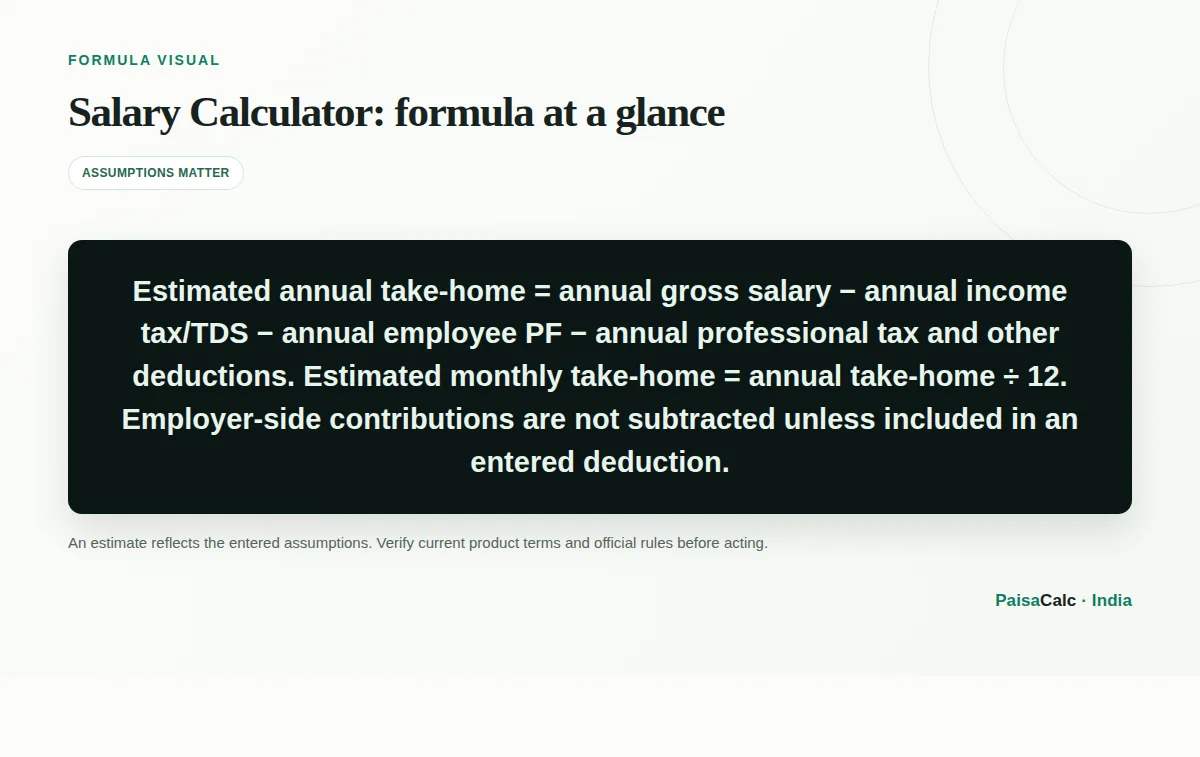
The formula is: estimated annual take-home = annual gross salary − annual income tax or TDS − annual employee PF − annual professional tax and other deductions. The monthly estimate is: estimated annual take-home ÷ 12. Every amount is denominated in Indian rupees. If annual gross salary is ₹12,00,000 and the three entered deduction totals are ₹1,20,000, ₹86,400, and ₹2,400, the estimated annual balance is ₹9,91,200 and the monthly average is ₹82,600.
This is deliberately not a tax-regime engine. The user supplies tax or TDS because tax depends on financial year, regime, eligible deductions, income types, and personal circumstances. The formula also does not infer whether a company calls a component basic pay, allowance, variable pay, gratuity, insurance, or employer PF; check the breakup and payslip.
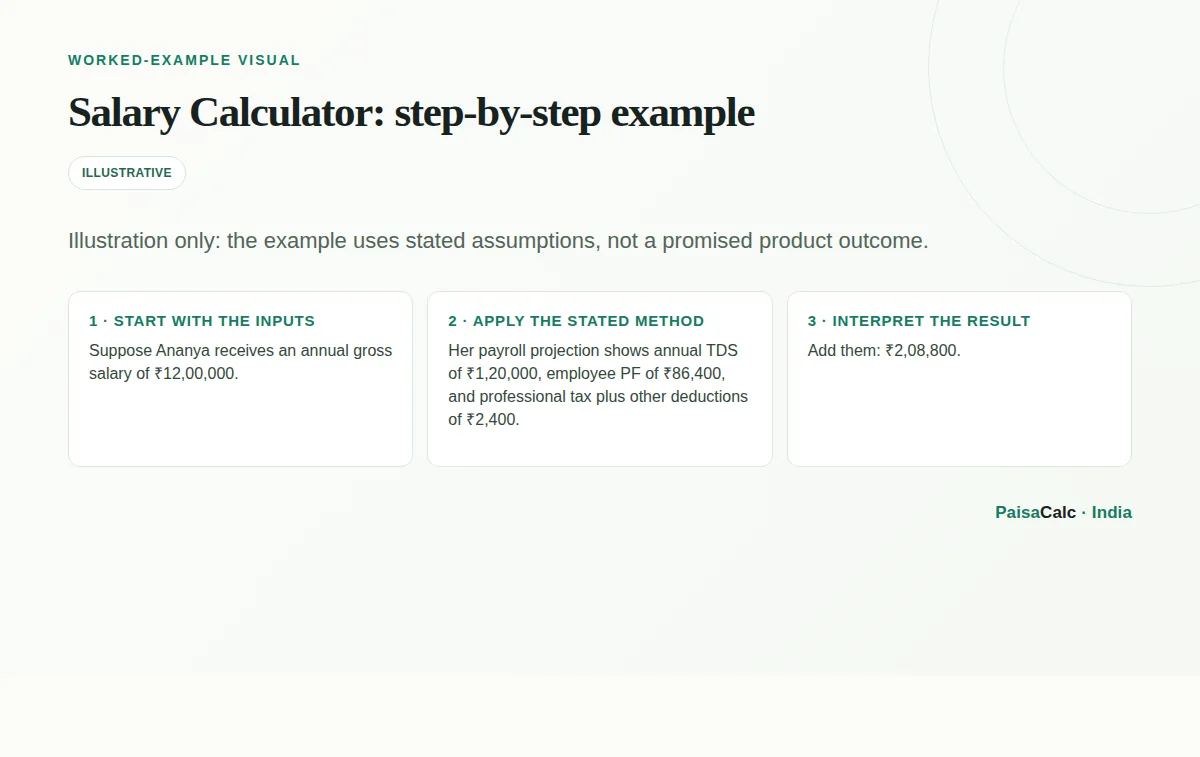
Suppose Ananya receives an annual gross salary of ₹12,00,000. Her payroll projection shows annual TDS of ₹1,20,000, employee PF of ₹86,400, and professional tax plus other deductions of ₹2,400. Add them: ₹2,08,800. Subtract from gross: ₹12,00,000 − ₹2,08,800 = ₹9,91,200 estimated annual take-home.
Finally divide ₹9,91,200 by 12, giving ₹82,600 as the estimated monthly average. Ananya should compare that result with an actual payslip after joining. If the annual TDS changes, a joining bonus is paid separately, or PF is calculated on a different eligible wage base, the estimate changes directly. The arithmetic is consistent; the quality of the result depends on the inputs.
A first-time employee can use the estimate to set a monthly budget before relocating to Hyderabad, Mumbai, Chennai, or another Indian city. A mid-career employee can compare a fixed-pay-heavy offer with one carrying a performance-linked component. Compare gross and deductions line by line rather than treating one CTC number as spendable cash.
The calculator can also support a conversation with payroll: check whether the entered figure is gross salary, whether TDS is a current projection, and whether professional tax or another recurring deduction is included. For a family planning a home purchase, the output is a cash-flow starting point, while the lender will normally examine payslips, bank statements, existing obligations, and its own policy.
The main benefit is clarity. By putting tax, employee PF, and other deductions in separate inputs, the user can see which assumption drives the difference between annual gross and bank-credit money. The monthly average is easy to compare with recurring expenses, an emergency-fund contribution, education costs, or a planned investment. It also makes offer discussions more precise: ask about fixed gross, variable pay, and employer benefits separately.
The calculator is quick to revise. If payroll gives a new TDS projection or professional-tax amount, refresh the estimate without rebuilding a spreadsheet. Treat the output as a planning anchor, not a promise; a payslip is better evidence of actual net pay.
The most common mistake is entering CTC as annual gross salary without removing employer PF, gratuity, group insurance, reimbursements, or conditional benefits. CTC can include costs that are not monthly cash. Another mistake is entering a monthly deduction into an annual field, or mixing a monthly gross figure with annual deductions. Confirm the period and label for every amount before calculating.
Do not treat TDS as final tax liability or assume a bonus arrives evenly across twelve months. Professional tax can vary by state and category, while PF treatment depends on payroll and applicable rules. Do not use an optimistic estimate for an EMI; reconcile it with recent payslips and keep a buffer.
Start a budget with the lower end of expected monthly take-home if TDS or variable pay is uncertain. Separate essentials from flexible spending, then build a liquid emergency reserve before treating the surplus as investable. A budget calculator can use this estimate, while an EPF or retirement tool models long-term savings separately.
For an offer comparison, make a two-column sheet for fixed gross salary, variable pay, employee deductions, employer contributions, benefits, and payment timing. Ask HR for the written breakup and the expected first-month treatment. Recheck assumptions after the first full payroll cycle and once tax declarations or investment proofs change the TDS projection. For material tax decisions, use current official guidance or a qualified tax professional.
A useful sensitivity test is to change one input at a time. For every additional ₹12,000 of annual deductions, the simple monthly estimate falls by ₹1,000, assuming all other inputs stay constant. This helps show the cash-flow effect of a revised TDS estimate or an annual payroll charge without pretending to forecast the underlying tax rule. A second test is to exclude irregular bonus pay and plan fixed expenses from fixed monthly gross alone.
For rigorous analysis, reconcile annual totals with Form 16, payslips, and the compensation statement. Check whether reimbursements are expense-dependent, employer contributions are excluded from cash salary, and joining payments are one-time. The calculator estimates the entered structure; it does not certify compliance, tax liability, or loan affordability.
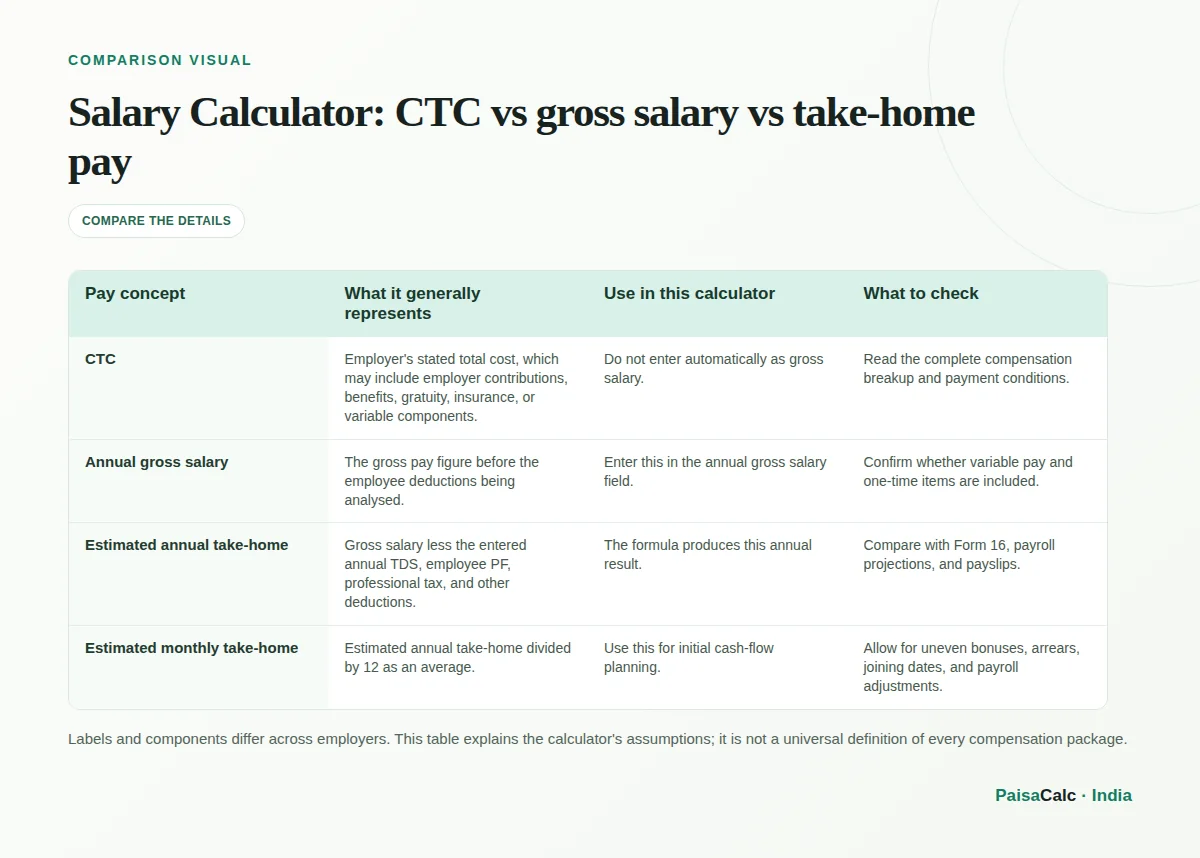
| Pay concept | What it generally represents | Use in this calculator | What to check |
|---|---|---|---|
| CTC | Employer's stated total cost, which may include employer contributions, benefits, gratuity, insurance, or variable components. | Do not enter automatically as gross salary. | Read the complete compensation breakup and payment conditions. |
| Annual gross salary | The gross pay figure before the employee deductions being analysed. | Enter this in the annual gross salary field. | Confirm whether variable pay and one-time items are included. |
| Estimated annual take-home | Gross salary less the entered annual TDS, employee PF, professional tax, and other deductions. | The formula produces this annual result. | Compare with Form 16, payroll projections, and payslips. |
| Estimated monthly take-home | Estimated annual take-home divided by 12 as an average. | Use this for initial cash-flow planning. | Allow for uneven bonuses, arrears, joining dates, and payroll adjustments. |
Labels and components differ across employers. This table explains the calculator's assumptions; it is not a universal definition of every compensation package.
No. Enter an annual tax or TDS estimate yourself. Tax depends on the financial year, regime, deductions, income types, and personal circumstances.
Usually not. CTC may include employer contributions, insurance, gratuity, variable pay, and benefits that are not paid as monthly cash. Review the compensation breakup.
Professional-tax rules and amounts can vary by state and income category. Use the amount shown by your employer or a current state-specific source.
Only if your annual gross figure includes them. A bonus paid irregularly may make monthly cash flow uneven, so do not assume an even monthly deposit.
Treat it as a budgeting estimate only. A lender may rely on payslips, bank statements, formal eligibility rules, and its own deduction calculations.
Enter annual deductions because the formula first calculates annual take-home. Multiply a recurring monthly deduction by 12, then check it against your payroll statement.
No, not automatically. The formula subtracts annual employee PF entered by the user; employer-side contributions are not deducted unless you include them in an input.
Use the best annual estimate for the period, or calculate separate periods and combine them. A single monthly average will not show the timing of a raise, joining month, or arrears.
Not by itself. First identify which parts of CTC are gross cash, variable pay, employer contributions, gratuity, insurance, or reimbursements, then enter only the comparable gross and deductions.
Your payslip may include different TDS, unpaid leave, arrears, bonuses, reimbursements, salary-period changes, or payroll-specific deduction rules. Update the inputs using a full-period statement.
Use primary and provider references to verify current rules, rates, and product terms.
Indian income-tax outcomes depend on the applicable financial year, regime, income details, and taxpayer circumstances; this page therefore requires the user to enter a tax or TDS estimate rather than inferring one.
The official FAQ describes UAN and passbook/account-record access. It does not determine a particular payroll’s PF amount from CTC.
This page supports the state-specific Maharashtra profession-tax schedule example; it is not nationwide rate guidance or evidence for employer-withholding instructions.
TAKE A 30-SECOND BREAK
Three questions to help the key ideas stick.